![Klir_Logo_Colour-B.png]](https://knowledgehub.klir.com/hs-fs/hubfs/Klir_Logo_Colour-B.png?width=181&height=90&name=Klir_Logo_Colour-B.png)
What are Monitoring Plans and How Do They Relate to Permits?
While a Discharge Permit acts as the static, legal "Source of Truth" for your regulatory rules, a Monitoring Plan is the active, operational container that executes those rules for a specific timeframe (e.g., an annual compliance plan).
When you associate a Monitoring Plan with a Discharge Permit, the plan automatically inherits the permit's compliance framework—including its Start/End dates, Limit Sets, and Monitoring Requirements. This essentially makes the permit's rules "live." It prepares the Klir system to generate expected sampling tasks, ingest incoming laboratory results, and perform immediate compliance evaluations against your permit's thresholds.
Reviewing Monitoring Plan Details
In the Wastewater module, you can access and review your plans by navigating to Wastewater > Monitoring plans.
Wastewater Monitoring Plans Overview
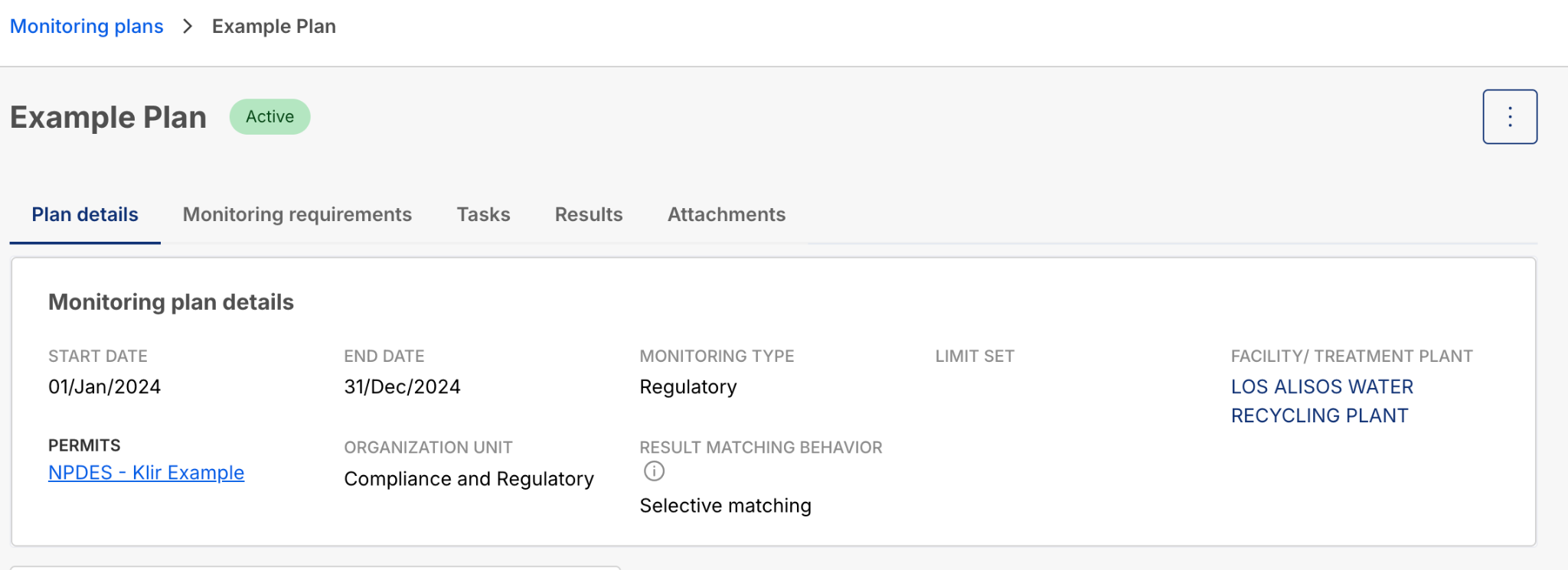
When you open a specific Monitoring Plan, the interface is organized into dedicated tabs to streamline your workflow:
- Plan Details: This tab contains the core metadata, including the linked Permit, the associated Facility / Treatment Plant, the Responsible Department, and the "Result Matching Behavior".
- Monitoring requirements: This tab lists all the specific parameters and schedules being tracked. It also features a progress bar displaying "Total results received vs expected" to give you a quick visual on collection progress.
- Tasks: A centralized view of all sampling tasks and work orders generated for this specific plan.
- Results: Displays the raw sample data that has successfully integrated into the plan, along with its pass/fail compliance status.
- Attachments: A repository for any related files or documentation.
What Users Can Edit
Because a Monitoring Plan is an operational tool, users have the flexibility to edit its details to match day-to-day realities without altering the underlying legal permit:
- Plan Duration (Dates): You can shorten the Start and End dates to create smaller, time-bound plans (like a quarterly or annual plan) within the wider permit window. If you reduce the monitoring period, the system will safely maintain any existing expected samples and tasks that fall within your newly defined timeframe.
- Result Matching Behavior: You can toggle the integration logic between "All applicable results" (which is generally recommended) and "Selective matching," depending on how you want incoming sample data to be routed.
- Monitoring Requirements: You can add new parameters (such as internal operational checks not mandated by the permit), or use the Batch Editor tool to quickly update sampling frequencies, sample methods, or analysis methods across multiple parameters simultaneously.
General Management of Monitoring Plans
Managing your active plans involves tracking tasks, ensuring data integrates smoothly, and archiving plans when they expire:
- Task Auto-Generation: To manage field team workloads, users can rely on the system to automatically generate and schedule sampling tasks based on the frequencies defined in the plan. The system can evenly distribute these scheduled dates to best suit the monitoring requirement.
- Sample Integration & Evaluation: As laboratory results are imported into Klir, the system matches them to the "live" Monitoring Plan. It immediately evaluates the values against the active limit sets, flagging any exceedances as a "Fail" directly on the Results tab.
- Archiving: Once a monitoring plan's timeframe has concluded, you can use the Archive function. Archiving a plan preserves all of its historical sampling data and tasks, but safely prevents new sample results from integrating into it and hides the plan from active dropdown menus