![Klir_Logo_Colour-B.png]](https://knowledgehub.klir.com/hs-fs/hubfs/Klir_Logo_Colour-B.png?width=181&height=90&name=Klir_Logo_Colour-B.png)
You already know what FOG and IPP are, and what matters most for your program. What this covers is how Klir supports both, side by side, from one connected operational data hub: what the two programs share, and where each one's own capabilities take over. This is a general map, not a prescription, every utility combines these a little differently.
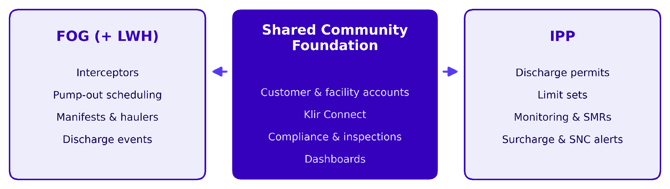
The Shared Foundation
Whichever programs a facility is enrolled in, it lives in the same Community data model:
- Unified customer & facility accounts: one facility, like a plant with an onsite cafeteria, can have both program tags manually applied to its profile, each with its own case manager
- Klir Connect: invite industrial users, service providers, and haulers, with role-based access and 2FA
- Review queue & communication: portal submissions and inquiries auto-route to the right program owner, with two-way messaging built in
- Compliance module: one Issue Register logs incidents and auto-generates issues for overdue milestones
- Inspections, admin & reporting: digital mobile inspections, NOVs, admin categorization, and compliance dashboards work across both programs
Where FOG (+ LWH) goes further |
Where IPP goes further |
|
|
How this looks in practice
Typical FOG customer |
Typical industrial user (IPP) |
|
|
Facility record |
Carries the FOG tag, usually with no discharge permit, or a very basic one |
Carries the IPP tag and a discharge permit |
|
Typical assets |
Grease interceptors, or sand and oil separators |
Discharge point, or points, tied to the permit |
|
Compliance |
No monitoring requirements and no sample data ingestion, since there's usually no permit driving it |
A monitoring plan and SMR cadence drive scheduled sampling, with results ingested and checked against the permit's limit set |
|
Inspections |
Still happen, but usually a simplified checklist, with no SMR requirement |
Scheduled and tracked alongside the permit's compliance history |
|
LWH tie-in |
If the utility also runs LWH, hauler manifest submissions link back to the pump-out |
Not applicable |
|
Klir Connect |
LWH drivers can submit manifests directly through the portal |
Industries can submit SMR results and reports directly through the portal |
A note on customization
This is a general guide. Every utility combines these features a little differently, it is your workflow and Klir's features coming together to run your program the way you need to.