![Klir_Logo_Colour-B.png]](https://knowledgehub.klir.com/hs-fs/hubfs/Klir_Logo_Colour-B.png?width=181&height=90&name=Klir_Logo_Colour-B.png)
Once a form's been scanned or entered manually, it lands in Data Collected, waiting for a quick review. Here's how to find it, check over what Klir captured, and get it submitted.
Getting to Scanned Your Form
All scanned forms will appear on the Data collected page under Data Collection. Because scanned forms require manual review before the data integrates into your platform, the initial status will always be Draft.
Reviewing Scanned Data
When you open a form that came from a scan, Klir restores the original layout and prefills the table cells and footer metadata (Operator Name, Date, Time, Notes) using OCR.
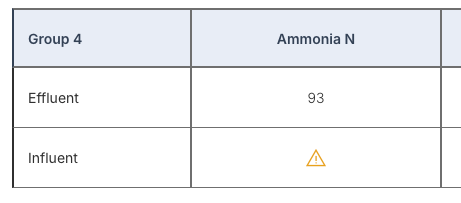
• Low-confidence cells: Cells where the OCR engine wasn't fully confident are flagged with a yellow triangle. Hover over it to see what's uncertain, for example an ambiguous character or a decimal placement issue. Click into the cell, enter the correct value, and the flag clears.
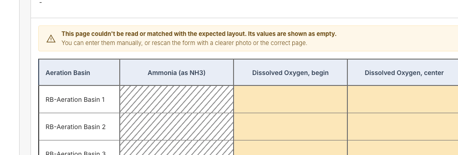
• Unrecognized pages: If a scan doesn't match a known layout, due to poor lighting, a missing footer, or blur, a yellow warning banner appears at the top and the table cells show empty. You can type the readings in manually or rescan the physical page.
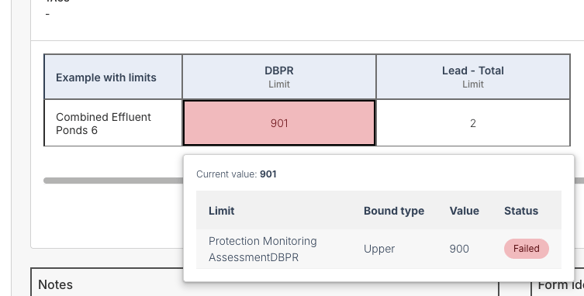
• Limit exceedances: Required or out-of-limit entries are highlighted in red or yellow. Hover over a highlighted cell to see the configured regulatory threshold.
Note: If you try to navigate away with unsaved changes, Klir will warn you before you lose your work.
Submitting the Form
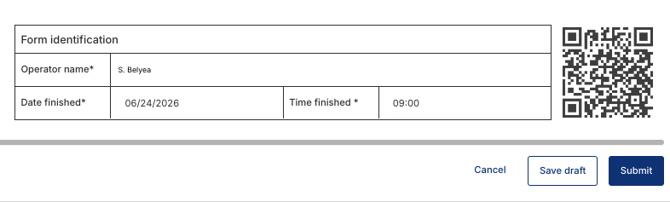
1. Fill in or confirm the footer details: Operator Name, Date Finished (MM/DD/YYYY), and Time Finished (12-hour format).
2. Check the confirmation box acknowledging that the entered data can be used to generate official sample results.
3. Click Submit once every required cell shows a valid status, or click Save Draft if you need to finish later.
Once submitted, Klir automatically converts the validated values into structured sample result records for regulatory evaluation and compliance tracking.
Note: Submitted data records in Data Collected aren't locked. If something needs correcting after submission, an authorized user can go back in, edit it, and resubmit. Multi-page forms are fully supported here too, across data entry, review, and PDF export, with the layout preserved throughout.