![Klir_Logo_Colour-B.png]](https://knowledgehub.klir.com/hs-fs/hubfs/Klir_Logo_Colour-B.png?width=181&height=90&name=Klir_Logo_Colour-B.png)
Most SFTP ingestion errors can be resolved by reviewing the Error Report, correcting the source data, and re-submitting the file. However, if you've worked through the troubleshooting steps and continue to experience issues, our Support team is here to help.
To help us investigate your issue as quickly as possible, please include the following information when reaching out:
- The Error Report attachment
- The source data file (when appropriate)
- Details of any troubleshooting steps you've already completed
Providing this information upfront helps our team better understand the issue and reduces the time needed to identify a resolution.
Contact Support
If you need assistance, please contact support@klir.com and include as much relevant information as possible.
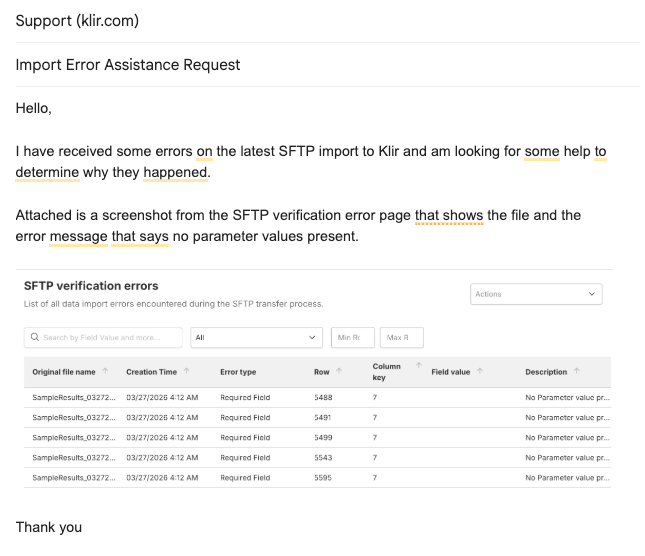
Tip: Screenshots of the error, the SFTP Import Errors page, or any recent ingestion summary emails can also be helpful when troubleshooting complex issues.
Suggested Screenshot
[Insert Screenshot: Example Support Request with Recommended Information]
You may find the answer in one of the troubleshooting resources below:
Related Articles
- How to Review Data Ingestion Errors – Learn where to locate ingestion errors and Error Reports.
- Understanding the Error Report – Learn how to interpret Error Report details and identify affected records.
- Understanding Common Error Types – Review common ingestion errors and recommended resolution steps.
- Re-Submitting Corrected Data – Learn how to successfully re-submit corrected files and verify successful ingestion.