![Klir_Logo_Colour-B.png]](https://knowledgehub.klir.com/hs-fs/hubfs/Klir_Logo_Colour-B.png?width=181&height=90&name=Klir_Logo_Colour-B.png)
If an SFTP import doesn't process as expected, the first step is to review the error details and identify what prevented the data from being ingested.
There are two ways to review SFTP data ingestion errors:
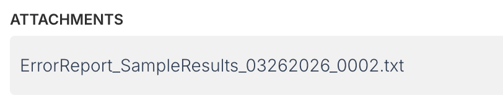
- Through the Error Report attached to the ingestion summary email.
- Directly within Klir using the SFTP Import Errors page.
Option 1: Review the Error Report from the Ingestion Summary Email
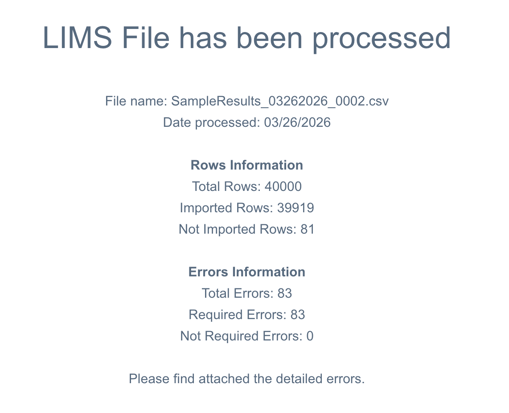
Each time an SFTP integration runs, Klir sends a summary email to the designated notification email address configured for your platform.
This email provides a quick overview of the ingestion, including:
- The number of records processed
- The number of records successfully ingested
- The number of records that failed ingestion
- The overall ingestion status
If any records could not be imported, an Error Report file will be attached to the email.
The Error Report highlights each affected record and explains why it could not be ingested. Reviewing this report is often the fastest way to identify what needs to be corrected before re-submitting your data.
Tip: Keep a copy of the Error Report while making corrections to your source data. It can serve as a checklist to ensure all reported issues have been addressed before re-importing the file.
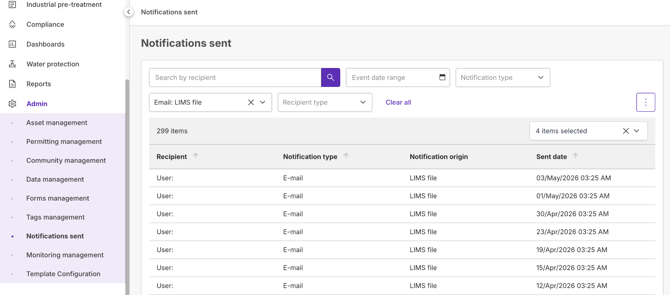
Note: Can't find the email? Any integration emails sent from your Klir platform can also be accessed from Admin → Notifications Sent. This is especially helpful if the original email has been deleted, archived, or sent to another designated recipient.
Option 2: Review Errors Within Klir
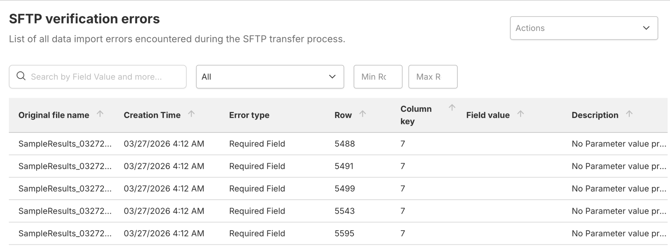
You can also review SFTP ingestion errors directly within Klir without locating the original notification email.
To access the SFTP Import Errors page:
- Navigate to Admin → Data Management.
- Select SFTP Import Errors.
- Review the list of ingestion errors and associated details.
- Use the information provided to identify and correct issues within your source data.
The SFTP Import Errors page provides a centralized view of historical ingestion failures, making it easy to review errors and track troubleshooting efforts over time.
Now that you've located your ingestion errors, the next step is understanding what the errors mean and how to resolve them.
Continue Reading
- Understanding the Error Report - Learn how to interpret the information included in the Error Report and identify the records requiring correction.
- Understanding Common Error Types - Review common ingestion errors and the recommended steps for resolving them.
- Re-Submitting Corrected Data - Learn how to successfully re-submit corrected files and verify successful ingestion.
- Resolving SFTP Data Ingestion Errors (Overview) - Get a quick overview of the error resolution process and available resources.
- Need Additional Help with Data Ingestion Errors? - Still stuck? Learn how to reach Klir Support and what information to include when contacting our team.